How AI Turns Still Images into Moving Video
Video content continues to dominate online platforms, but producing even a short clip traditionally requires a camera, a subject, and a fair amount of editing time. A newer approach changes that equation: instead of filming a scene, you start with a single still image and let software generate the motion. The result is a short video that looks as if it was recorded, not animated frame by frame. Understanding how this works and where it fits into content creation can help you decide whether it is worth exploring for your own projects.
The core idea is simple: take one photograph or digital image and extend it forward in time. The software infers what happened just before the shutter clicked and what happens next, then produces a sequence of frames that follow naturally from the original. This is not the same as animating a drawing by hand or applying a preset filter. The system attempts to understand the scene, the objects in it, and how they would move under real-world physics. A flower in a breeze, a person turning their head, water flowing over rocks - all of these can be extrapolated from a single frame with surprising fidelity.
The technical backbone is a type of generative model trained on large datasets of real video. By watching countless hours of footage, the model learns the visual patterns of motion: how light shifts across a surface, how fabric drapes and ripples, how shadows stretch and shrink. When you feed it a still image, it searches its internal knowledge for the most probable movements that match the content of your picture. The result is a clip that often feels like a natural continuation of the moment, rather than a crude animation.
What Sets Modern Image-to-Video Apart
Earlier attempts at moving a still image often produced jittery or unnatural results. Objects would warp, backgrounds would flicker, and the overall effect was more unsettling than cinematic. Recent advances have improved on three fronts: motion consistency, temporal coherence, and audio integration.
Motion consistency means that once a part of the image starts moving, it continues in a believable direction. A car traveling across the frame does not suddenly reverse or distort because the model understands the continuity of movement. Temporal coherence refers to the smoothness of the transition from one frame to the next. Each frame looks like a natural step forward, not a jump cut. When both are working well, the video holds together as a single continuous take.
The addition of cinematic audio takes the experience further. Some tools now generate a sound track that matches the scene - wind for an outdoor landscape, footsteps for a street scene, ambient noise for a busy interior. Audio that aligns with the visual motion reinforces the illusion that the image has come to life. This is especially valuable for social media clips and short-form video content, where viewers expect a polished, immersive experience.
Practical Workflows for Creators
Using an ai image to video tool typically involves three steps. First, choose or create a still image that has clear subject matter and decent resolution. Blurry or overly complex images can confuse the model and lead to less convincing motion. Second, set parameters that guide the output: the duration of the clip, the type of motion (gentle pan, dramatic zoom, subtle subject movement), and the style of audio. Third, let the system process the image and review the output. Many tools allow you to regenerate or tweak settings until the result looks right.
One common workflow is to start with a high-quality photograph taken on a phone or camera. Because the model works from the pixels you give it, a sharp, well-lit image produces better results than a grainy or low-contrast one. Another approach is to use an AI-generated image as the starting point. This can be especially useful for conceptual projects where no real-world photo exists. The combination of generative still images and motion opens up options for storytelling that would be expensive or impossible to film.
Things to Watch Out For
Not every image works well. Scenes with complex overlapping objects, such as a person walking through a crowd, can confuse the model and produce artifacts. Faces and hands are notoriously difficult for generative models to animate consistently. You may see distortions around fingers or expressions that shift unnaturally. These are limitations of the current technology, and they improve with each generation of tools, but they are worth keeping in mind when planning a project.
Another consideration is length. Most image-to-video generators produce clips that last a few seconds. Extending the duration often reduces quality because the model has to invent more frames from a limited source of information. For social media posts, a two-to-four-second loop is often enough. For longer narratives, you may need to sequence multiple clips or supplement with traditional video editing.
Where It Fits Into Content Creation
Short-form video content is the most natural home for this technology. Platforms like Instagram, TikTok, and YouTube Shorts reward quick, engaging clips that feel dynamic. A single still image animated with subtle motion can hold a viewer's attention longer than a static photo while requiring far less effort than a full video shoot. Marketers use it to bring product shots to life, educators use it to illustrate processes that are hard to capture on camera, and artists use it to explore new forms of visual expression.
The tool also helps with storytelling in situations where video footage is unavailable. A historical photograph, a concept sketch, or a remote location can all be turned into a short video clip that adds emotional weight to a presentation or article. Because the motion is generated, not filmed, the creator keeps control over the pacing and mood.
Motion Consistency and Temporal Coherence in Practice
When evaluating an image-to-video AI, these two concepts matter most. Motion consistency means that objects keep their shape and direction across frames. Temporal coherence means that the sequence feels smooth, without sudden jumps or flickers. A tool that scores well on both will produce clips that look like real footage. One that struggles will produce results that feel more like a glitchy animation. The best current tools handle both well enough for professional use, especially for simple scenes with one or two main subjects.
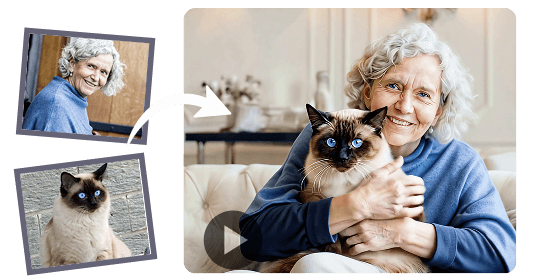
For creators who need reliable output, testing with a few test images before committing to a full project is a good habit. Run the same image through different settings and compare the results. Look for warping around edges, unnatural blinking in portraits, and any audio that does not match the visual content. Over time, you will develop a sense of which images work and how to adjust parameters for different types of scenes.
The field is moving quickly. What looked impressive six months ago now seems ordinary, and the pace of improvement shows no sign of slowing. For anyone who works with visual content, understanding the basics of ai image to video is becoming as useful as knowing how to frame a shot or adjust exposure. It is not a replacement for traditional video production, but it is a capable addition to the toolkit, especially for projects that need motion without the overhead of a full production.